PROJECT / CASE STUDY
Sangfroid
An offline-first Android interview preparation app that turns CV evidence, skills, practice history, and previous answers into personalized questions, guided practice, structured AI feedback, saved revisions, and measurable progress.
Personalize
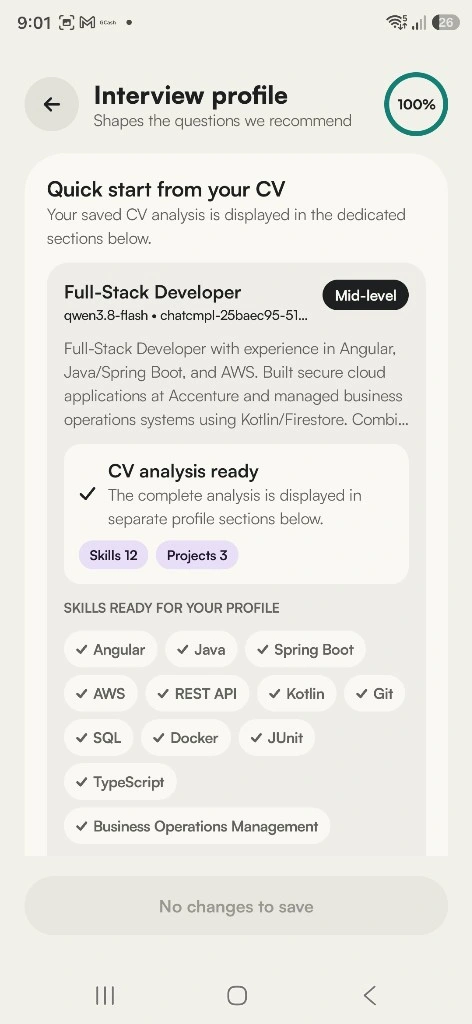
Import CV evidence and build an interview profile from skills, projects, experience, target roles, and areas that need more practice.
Practice
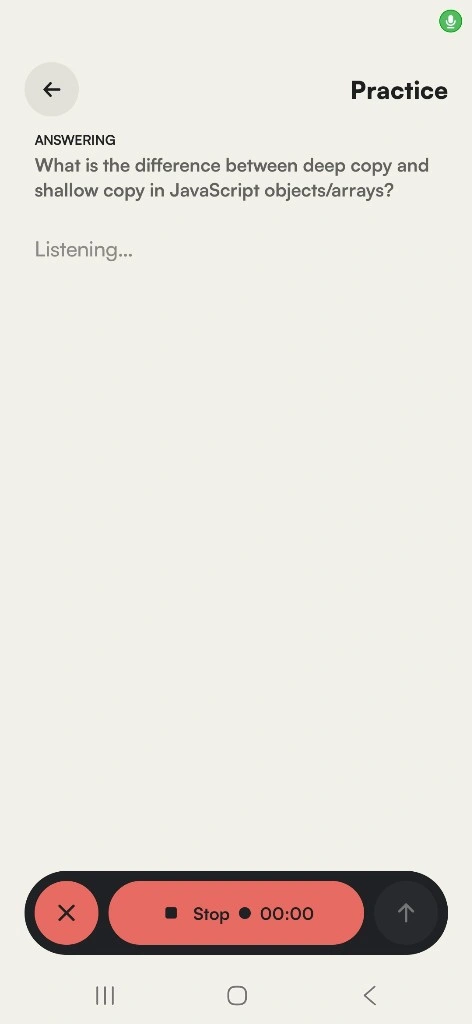
Answer recommended or saved interview questions using text or voice. Drafts persist locally and each submitted answer becomes a separate attempt.
Improve
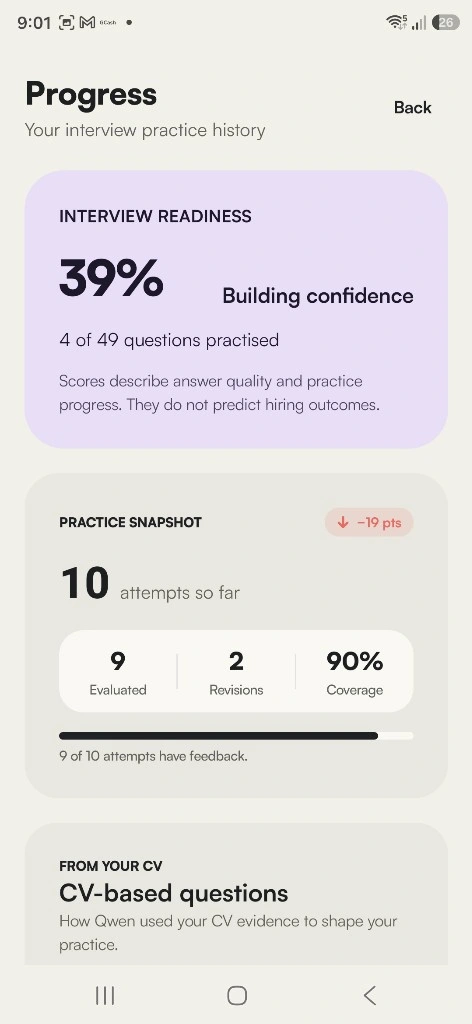
Use structured feedback, saved revisions, previous attempts, score trends, feedback coverage, and CV insights to decide what to practise next.
Practice Built Around the Candidate
Instead of treating interview preparation as a static question bank, Sangfroid connects professional evidence, question recommendations, repeated attempts, feedback, and progress into one practice system.
Questions With a Reason
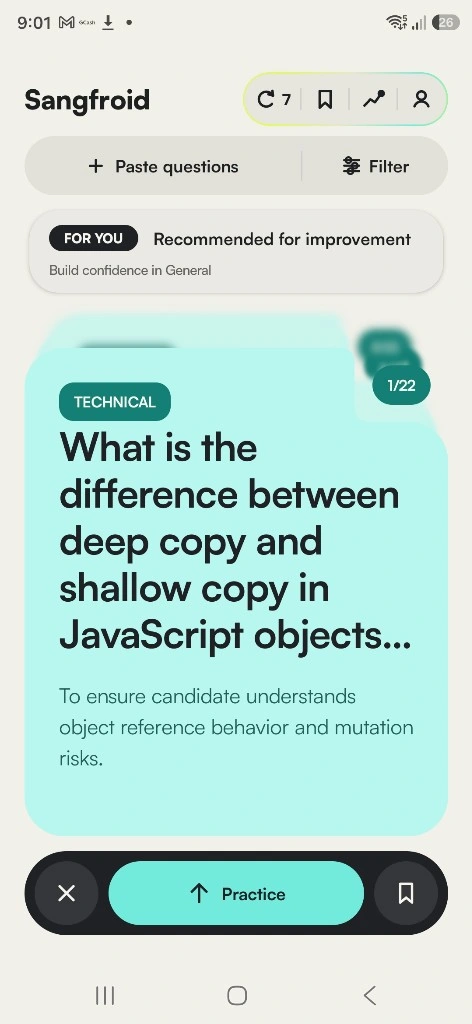
The feed recommends questions using category, difficulty, CV evidence, saved skills, target-role context, and previous practice. Each question also explains why an interviewer may ask it.
A Reusable Practice Library
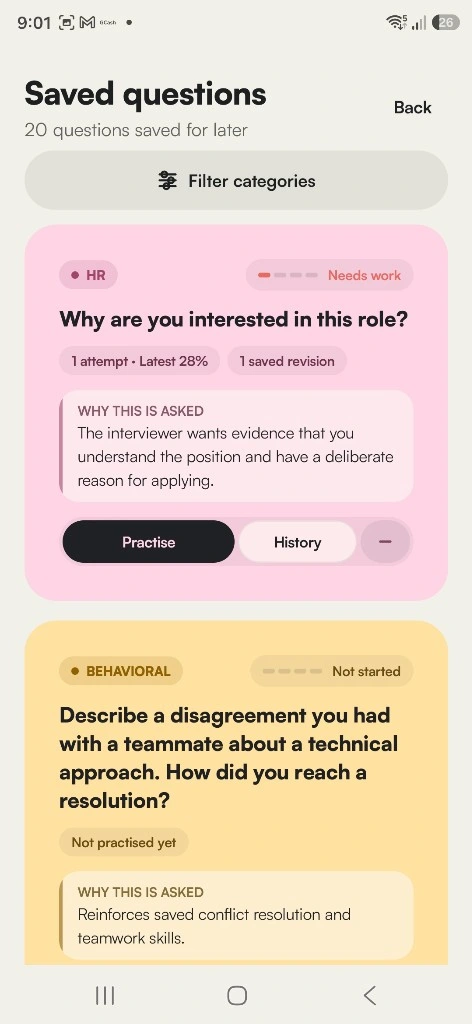
Saved questions preserve category, previous attempts, latest scores, revisions, history, and why the question matters. Saved and generated questions use the same practice workflow.
Progress Backed by Evidence
Progress combines attempts, completed evaluations, saved revisions, feedback coverage, score movement, question performance, and CV-based practice instead of reducing progress to a simple streak.
Guidance Without Replacing the Candidate
The answer editor works as a persistent practice workspace. Candidates can type, answer by voice, revisit previous attempts, and reuse earlier answers without leaving the question.
An optional Qwen-generated ideal answer appears as lightweight continuation guidance rather than replacing the candidate’s response. The editor remains usable while new guidance is generated.
Drafts persist automatically and every submission becomes its own attempt, preserving practice history instead of overwriting previous work.
Offline-First Android Architecture
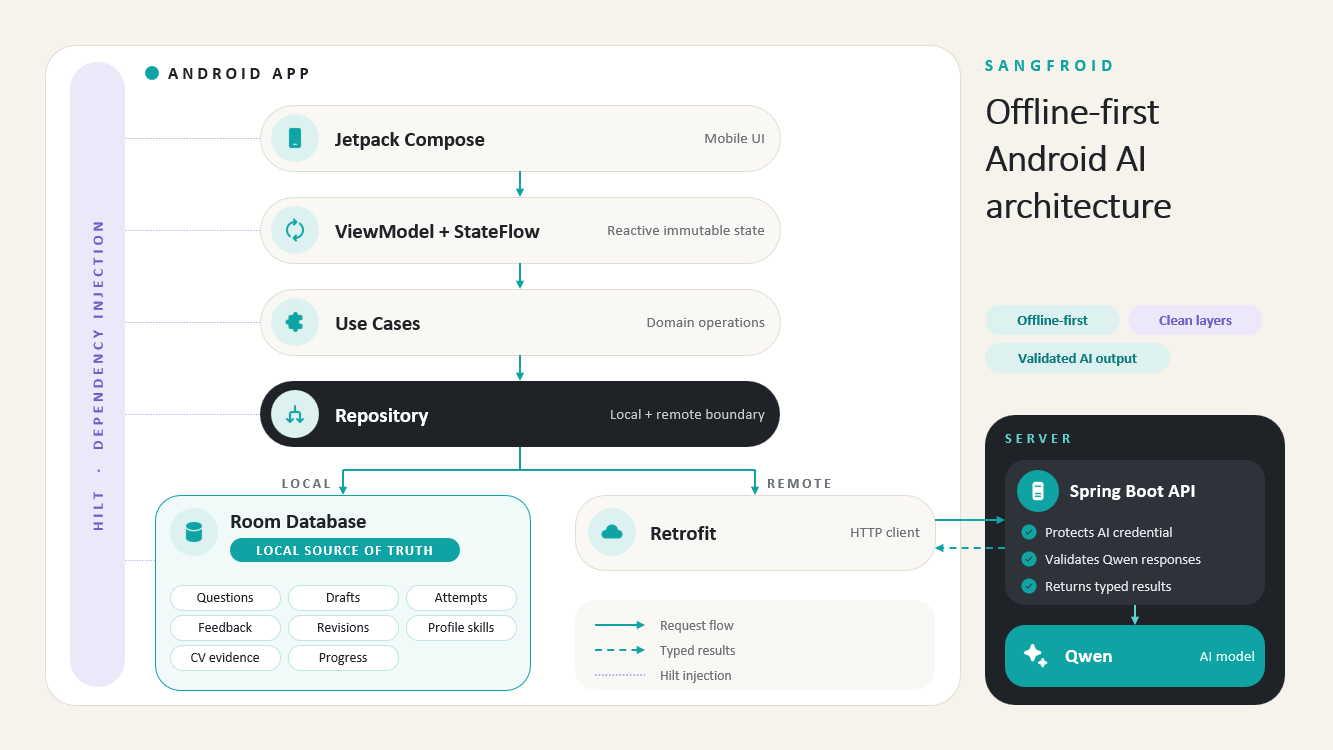
The Android client uses Kotlin and Jetpack Compose with an MVVM-style layered architecture. ViewModels expose UI state through StateFlow, use cases contain focused application operations, and repositories separate the domain layer from persistence and networking.
Room provides local persistence for questions, drafts, attempts, evaluations, revisions, profile data, CV evidence, saved questions, and progress. Retrofit handles remote operations through the Spring Boot API, while Hilt provides dependencies across the Android layers.
Built End to End
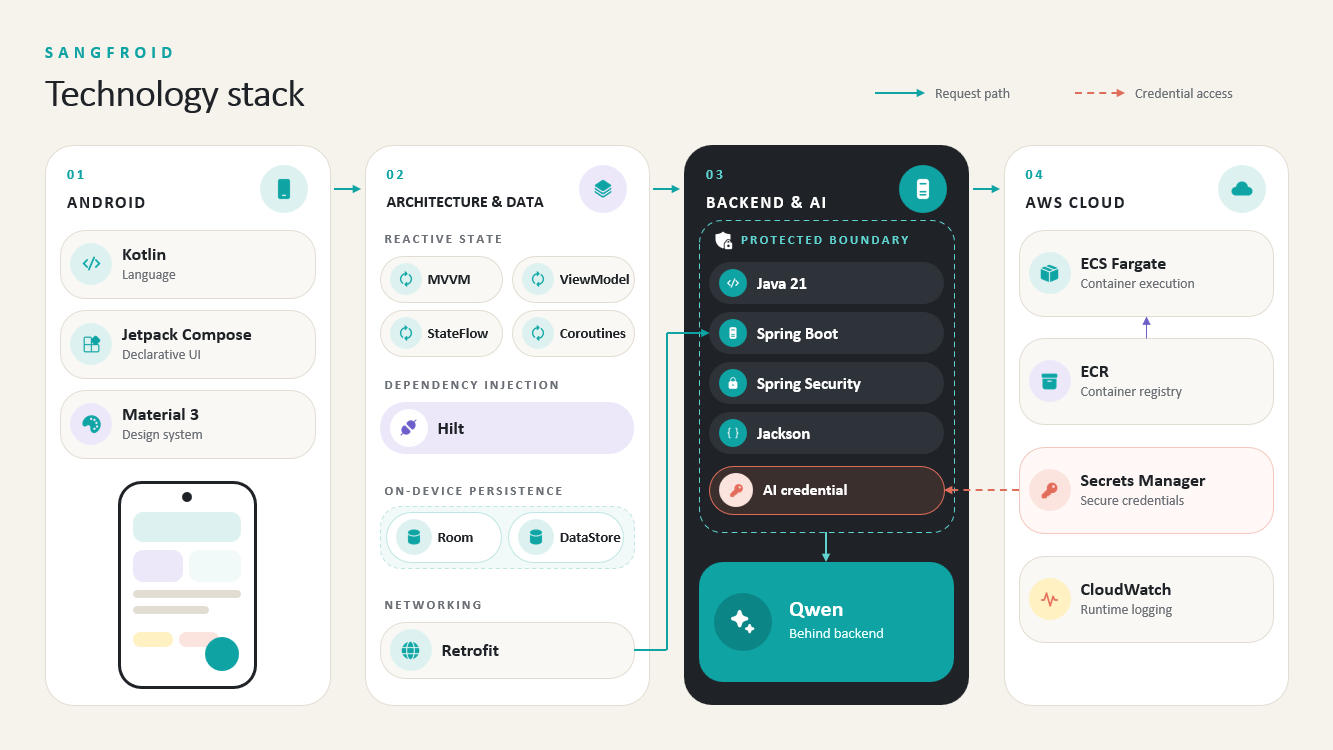
Sangfroid spans the native Android experience, local persistence, REST networking, backend development, generative AI integration, containerization, and AWS deployment.
The client uses Kotlin, Jetpack Compose, Room, Hilt, StateFlow, coroutines, and Retrofit. The backend uses Java 21, Spring Boot, Spring Security, Jackson, and Qwen, with AWS providing the production runtime and operational infrastructure.
AI Behind a Controlled Backend Boundary
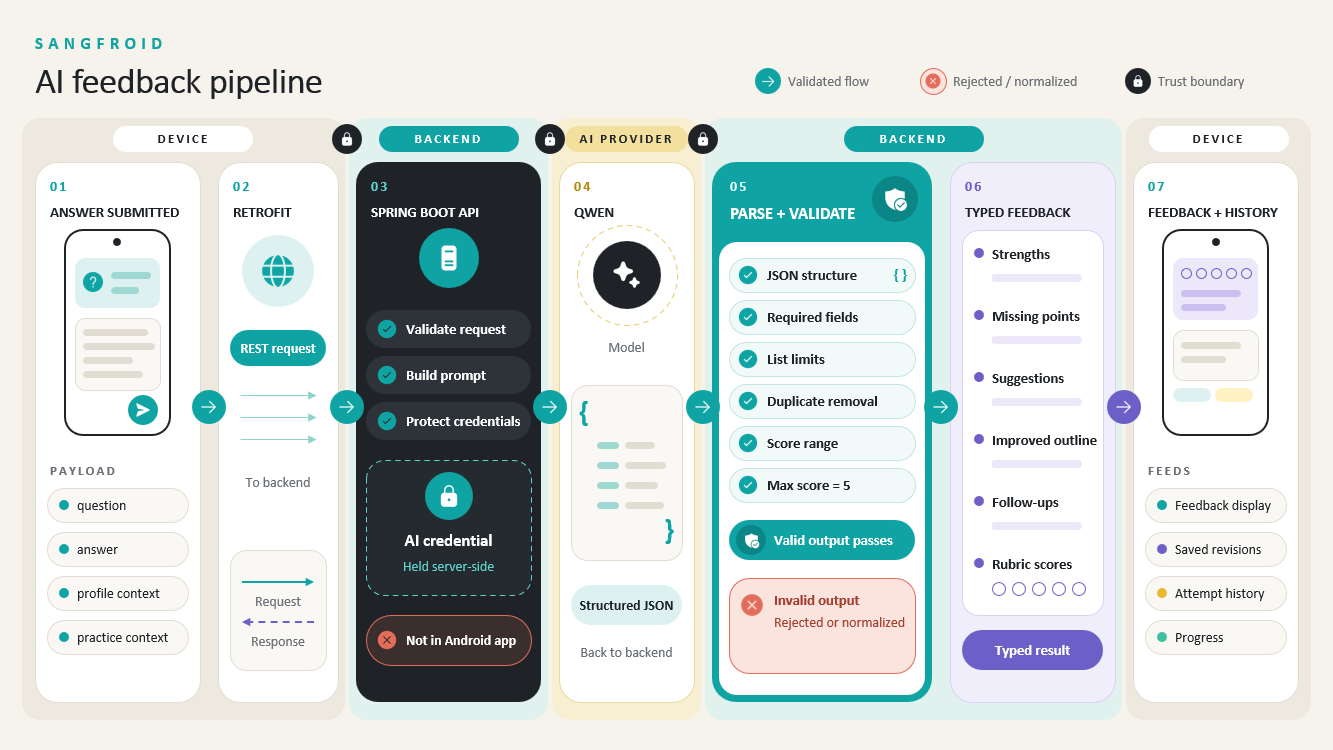
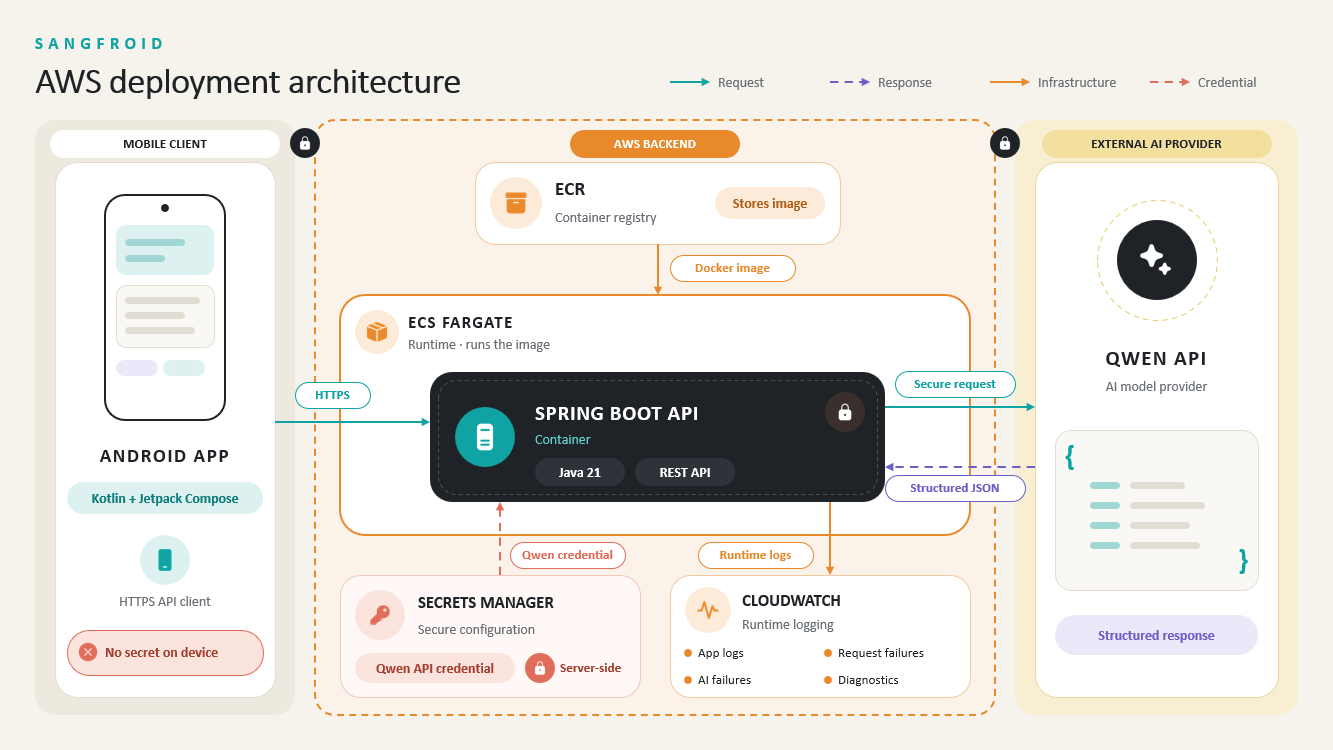
The Android application never talks directly to Qwen. Retrofit sends the interview context to a Java 21 Spring Boot API, which builds the prompt, calls Qwen, and controls the response before sending typed data back to Android.
Generated output is parsed, cleaned, normalized, and validated rather than trusted directly. The parser handles malformed JSON, blank or duplicate values, unexpected list sizes, and rubric scores outside the application contract.
Valid evaluations can contain a summary, strengths, missing points, suggestions, an improved outline, an improved answer example, follow-up questions, and rubric scores.
Containerized and Deployed on AWS
The Spring Boot backend is containerized so deployment remains separate from the Android application. Amazon ECR stores the container image and ECS Fargate runs it without requiring a manually managed server instance.
AWS Secrets Manager provides sensitive backend configuration such as the Qwen API credential, keeping secrets outside the Android application and container source. CloudWatch provides runtime logs for application behavior and troubleshooting.
Practice History, Not Disposable Answers
Every submitted answer is stored as its own attempt. Candidates can move between the question and previous attempts, inspect evaluation status, reopen feedback, reuse an earlier answer as a new draft, or delete an individual attempt.
Improved answers are versioned separately from attempts. Multiple AI-assisted revisions can therefore be saved for the same response without replacing earlier versions, making improvement visible over time.
From CV Evidence to the Next Question
CV import uses semantic extraction rather than a hardcoded list of technical skills. This allows Sangfroid to identify useful professional evidence across technical and non-technical backgrounds.
Structured CV evidence, profile skills, target-role preferences, weaker practice areas, and previous progress can influence future questions. CV insights also show which evidence has already shaped practice and what has not yet been explored.
Engineering Beyond the Happy Path
Building Sangfroid meant solving interaction and reliability problems that appear during real use: keeping editor focus while an ideal answer generates, preserving the visible editing position during asynchronous updates, handling non-deterministic Qwen output, and keeping long attempt histories usable on a phone.
The interface also evolved around those edge cases. Attempt tabs scroll and reposition automatically, the trailing folder tab connects cleanly with the practice card, long-running feedback reduces to a compact loading state, and completed AI results expand back into the full feedback experience.
The result is one connected product model: CV evidence informs questions, questions create attempts, attempts create feedback and revisions, and those outcomes feed progress and future practice.
Explore the Source
The Android source code, project history, and implementation details are available on GitHub.